
Squirrel Notes 2.0
Squirrel Notes 1.0: Now
A few months back I decided to build myself a notes tool: Squirrel Notes. It had three main requirements:
- Markdown
- Fully encrypted (How Squirrel Notes Keeps Your Data Private)
- Lots of keyboard shortcuts
Squirrel Notes delivered on all three. Using GitHub Copilot's (at the time) very generous per-request AI offering, I built a well-featured notes tool. In fact, I'm writing the draft of this post in Squirrel Notes, in my Blog collection.
It's been part of my workflow ever since. Adding STDIO MCP was a game changer, as I covered in Using Claude as a First-Class Interface for Squirrel Notes. I use one note as a shared AI brain between my work and personal Claude accounts. I also use a collection as an inbox, which helps me keep on top of tasks that a Claude routine pulls out of my email, Slack and Jira.
I also launched it as a product, with its own website, and acquired approximately zero users. Oops. A few people tried it out, but it didn't stick, and solving that isn't something I've invested in yet. Then we had a baby, and the project went on the back burner for a while.
Rather than figure that out, I'm doing what any good developer does: investing in 2.0, with a few new features and a new look and feel.
Squirrel Notes 2.0: Next
2.0 includes a lot of changes. Here are the most significant ones.
Design overhaul The current design grew organically as features were added. I've used Claude Design to overhaul it, with new iconography, a new logo and new navigation.
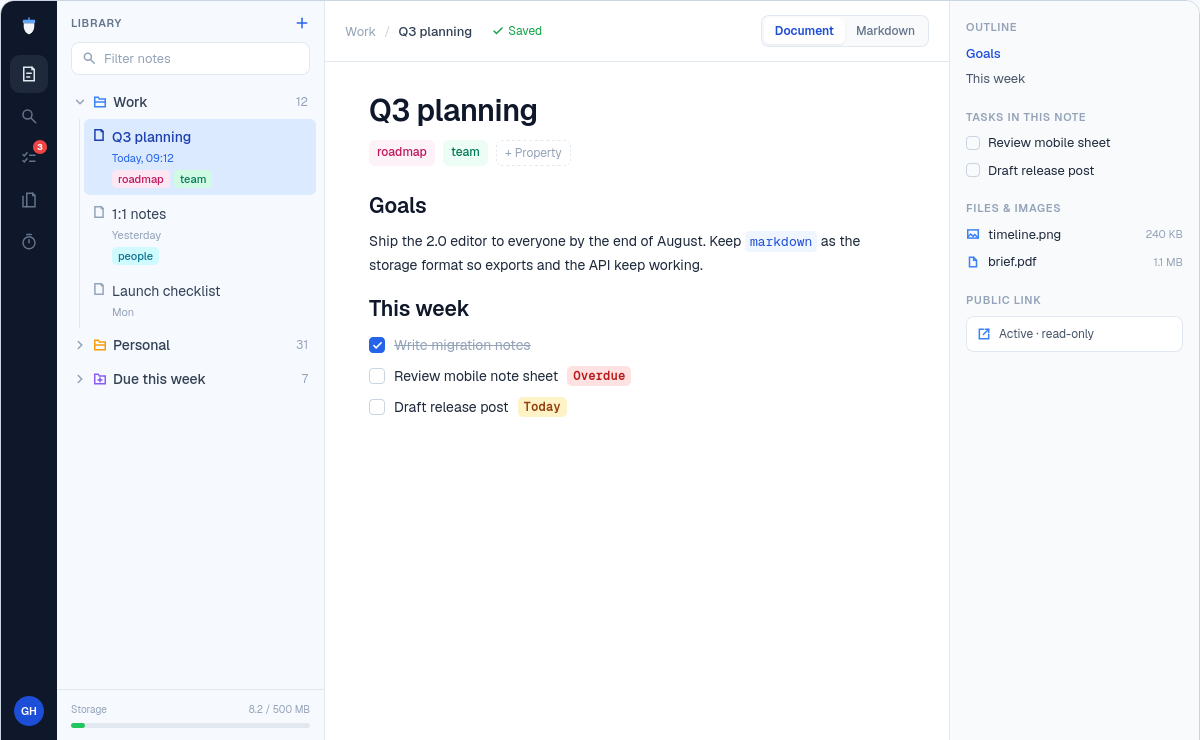
See the Claude Design specification for 2.0.
WYSIWYG (ish) As much as I love writing in Markdown, it's clearly not for everyone. 2.0 adds a WYSIWYG mode, or more accurately an inline live Markdown preview, and the split view is gone. In this mode the document is rendered in place, and clicking into a line lets you edit its Markdown.
The split view definitely came from my developer brain. In reality the preview on the right was rarely useful. More often than not I was just staring at the Markdown, with the added overhead of rendering two views and keeping them in sync.
No more tabs I never used tabs except to close them. Going back to the library or using Cmd + P was much more useful.
Tying pinned tabs to pinned notes at the top of a collection didn't work well either. I want to pin notes at the top of a collection without them being open all the time.
Squirrel Notes 3.0 and beyond?
What's next? I'm exploring how Squirrel could use agents and integrate directly with other systems, while keeping privacy front of mind.
How could I run agentic workflows against encrypted data? The MCP package already lets Claude access decrypted notes. Maybe the answer is to make it opt-in and provide a self-hosted package that runs on your own infrastructure. Or perhaps I'll just open source the whole thing, since the product isn't likely to gain traction without investment on my part.